
Speaking as Dad of two children I can say parenting in today’s digital world is a challenge — especially when managing your child’s internet usage. Kids have multiple ways to connect online, from phones and tablets to laptops gaming systems, which makes it difficult to track their online activity. And that’s where a parental control router shines—stepping in to give you the tools to safeguard your family’s online experience without the constant worry
Parental control routers allow you to not only control your children’s access to the internet but also monitor where they’re going and when necessary prevent them from going places that could put them at risk. With these controls available at the router it means that instead of having to install software on individual devices, you just need to add the devices to age based profiles.
The advantage of using a parental control router is that they do all of the work automatically for you, based on the fact that they cover ALL of your devices that are connected to your network, therefore you don’t have to deal with multiple applications or settings on individual devices. With a parental control router, you can:
• Set time limits on the internet
• Filter inappropriate content
• Pause the internet during homework hours or bed time
• View a child’s browsing history
So what should you look for when choosing a parental control router? The answer is easy. What matters most is how easily you can use the router, and how much flexibility you get with filtering and limiting your child’s access to content. With that in mind though you still want your router to the have best networking features available in your price range. The current generation of routers are very powerful and offer cutting edge features like Wi-Fi 7 or mesh topology. However, you also should be aware that some models require a subscription for premium features like virus and malware scanning.
Best Parental Control Routers
I extensively researched parental control routers when I upgraded my family’s router earlier this year. To make the most informed decision for my family’s needs I leveraged the power of AI with Grok and Perplexity to analyze the information — comparing product specifications, user reviews and expert benchmarking to rate the top products available. The routers listed below are result of that research and are provided to assist you in making a well-informed decision in the most time-efficient manner possible. I actually own 2 of the routers below and will share my experiences and how it has worked for our family.

- VPN SERVER: Archer AX21 Supports both Open VPN Server and PPTP VPN Server
- DUAL-BAND WIFI 6 ROUTER: Wi-Fi 6(802.11ax) technology achieves faster speeds, greater capacity and reduced network congestion compared to the previous gen. All WiFi routers require a separate modem. Dual-Band WiFi routers do not support the 6 GHz band.
- AX1800: Enjoy smoother and more stable streaming, gaming, downloading with 1.8 Gbps total bandwidth (up to 1200 Mbps on 5 GHz and up to 574 Mbps on 2.4 GHz). Performance varies by conditions, distance to devices, and obstacles such as walls.

TP-Link Archer AX21

The TP-Link Archer AX21 brings solid parental controls and WiFi 6 technology to the table without costing a fortune.
Pros
- Parental controls for managing screen time and filtering content across all devices
- WiFi 6 handles multiple devices streaming and gaming at once—less lag, more happy family members
- VPN server support adds privacy, which you rarely see at this price
Cons
- Setup interface isn’t the friendliest for folks new to routers
- Some users mention connection drops that need a quick reboot
- Coverage might not cut it for really big homes, even with four antennas
The Archer AX21 brings modern WiFi 6 technology to families who want to control internet access for kids but still need fast speeds. You can set schedules and block unwanted sites using the app—no advanced degree required.
The dual-band setup splits traffic between 2.4 GHz and 5 GHz bands, so things stay stable even if everyone’s online at the same time. It works with any internet provider, making it easy to ditch that rental box.
No subscription needed for parental controls, which is a win for your wallet. Four high-gain antennas and beamforming focus the signal right where you need it, instead of just blasting it everywhere.
OFDMA in WiFi 6 means the router talks to several devices at once, not just one-by-one. Handy if the kids are on tablets while you’re working from home.
The VPN server is a nice touch for parents who want a little extra security. TP-Link throws in 24/7 support and a two-year warranty, which is honestly better than most.
The Archer AX21 covers basic to moderate needs without making you jump through too many hoops after setup.
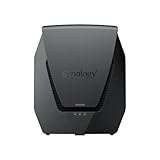
- Dual-band Wi-Fi 6 with 5.9 GHz support and configurable WAN/LAN 2.5GbE port enable fast wireless and wired transfers
- Comprehensive network security provided through Threat Prevention, VLAN segmentation, and WPA3 support
- Standalone router that can be incorporated into a mesh system for whole home coverage
Synology WRX560
The Synology WRX560 is a strong pick if you want both detailed parental controls and tight network security features.
Pros
- Web filtering and parental controls give you real oversight of family internet use
- Network security suite includes threat prevention and VLAN segmentation—serious protection
- Mesh capability means you can expand coverage without juggling multiple networks
Cons
- Setup and management can feel daunting if you’re not used to advanced networking gear
- Costs more than basic routers with simpler controls
- Mobile app is easiest for setup, but not everyone loves managing through their phone
The Synology WRX560 offers enterprise-level parental controls for home use. Parents can set up schedules, filter by content category, and monitor which devices are visiting what sites.
The filtering system lets you get pretty granular—different rules for different times of day, for example. It’s all built on Synology’s Router Manager OS, which can juggle up to 150 connected devices at once.
Perfect for homes packed with smart gadgets, streams, and personal devices. Dual-band Wi-Fi 6 keeps things smooth, even with everyone online at once.
Security features are a big deal here. The threat prevention system blocks sketchy sites and stops devices from talking to known malicious servers.
VLAN segmentation lets you create separate network zones, which is great if you want to isolate IoT stuff or set up a “kid-only” network. The router works solo or as part of a mesh system if you need to expand coverage down the road.
The DS router app makes setup and management easier, but unlocking all the parental controls does take a little learning curve. User reviews point to reliable coverage and connectivity for most homes.
There’s a 2.5Gbps Ethernet port for faster internet and local transfers—future-proofing for when speeds go up. WPA3 encryption adds another layer of data protection for the family.

- Coverage up to 2,500 sq. ft. for up to 25 devices
- Fast AX5400 Gigabit speed with WiFi 6 technology for uninterrupted streaming, HD video gaming, and web conferencing
- NETGEAR routers have security features enabled out of the box with automatic firmware updates, and industry-leading safety features to help protect you and your family
NETGEAR Nighthawk AX6 WiFi 6 Router
This one makes sense for families who want solid parental controls and speedy WiFi 6 with some extra security thrown in.
Pros
- Comes with a year of NETGEAR Armor security—no extra cost at first
- Smart Parental Controls built in for managing kids’ online time
- Handles up to 25 devices and covers 2,500 square feet, so most homes are set
Cons
- Only works in the U.S.—not ideal if you need international support
- Security subscription costs money after the first year
- Dual-band only, so no tri-band option like some pricier competitors
The NETGEAR Nighthawk RAX54S brings WiFi 6 speeds (up to 5.4 Gbps) for streaming, gaming, and video calls all at once. Parents get dedicated controls in the Nighthawk app for managing screen time and filtering content.
Setting up schedules or pausing internet for certain devices is pretty straightforward—no networking degree required. The 1.5GHz triple-core processor keeps traffic moving, and four Gigabit Ethernet ports let you plug in consoles or desktops.
There’s a USB 3.0 port for external storage or printers. NETGEAR Armor protects every device from malware and hackers, including phones, computers, and smart home stuff.
The security features are enabled out of the box, with automatic firmware updates. Setup is quick through the mobile app—just hook it up to your modem and follow the prompts.
It works with any ISP offering up to 1Gbps speeds. Coverage is strong across medium-sized homes, with high-power amplifiers helping avoid dead zones.
Customer feedback points to stable, reliable connections. The dual-band setup splits devices between 2.4GHz and 5GHz, easing congestion when everyone’s streaming or gaming.
WiFi 6 with OFDMA boosts efficiency over older routers, so things just work better, even when the whole family is online.
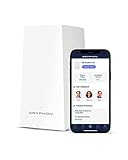
- PROTECT YOUR CONNECTED HOME – Experience safe, reliable Internet for your family or small business with Gryphon AX—the all-in-one Mesh WiFi 6 Router, engineered to deliver fast, efficient coverage, enhanced security, and advanced parental controls without any data bottlenecks
- ADVANCED PARENTAL CONTROLS – Create a safe Internet experience for young users with your WiFi mesh system’s active content monitoring, app and website blocking, individualized time limits, and comprehensive insights so you can better monitor your kids’ screen time (4)
- POWERFUL MESH WIFI 6 – AX4300 technology provides impressive coverage and lightning-fast speeds, no matter how many users and connected devices are added to your network, as simultaneous tri-band radios and 4x4 MU-MIMO deliver up to 3,000 sq. ft. of coverage off a single Gryphon mesh router (1) (2)
Gryphon AX
The Gryphon AX is a parental control router that leans into content filtering and Wi-Fi 6 coverage. Families who care about what their kids see online might appreciate the granular controls, though there are some gripes about speeds not quite matching expectations.
Pros
- Detailed parental controls with content filtering, app blocking, and individual time limits for each child
- Covers up to 3,000 square feet with tri-band Wi-Fi 6 technology
- Built-in malware protection and intelligent intrusion detection across all connected devices
Cons
- Some users experience slower speeds than anticipated for the price point
- Setup requires using a mobile app rather than web-based configuration
- Mixed feedback on actual performance improvements when adding mesh units
The Gryphon AX tries to make life easier for parents who want to manage their kids’ online world. You can set up bedtimes, screen time limits, and monitor what each child is doing—sometimes it feels like a digital babysitter.
Wi-Fi 6 brings decent coverage to most homes, and the tri-band setup means you can have a bunch of devices online without everything grinding to a halt. Folks upgrading from older routers often find their dead zones magically disappear.
Security isn’t just an afterthought here. There’s a built-in firewall, plus automatic screening for malware and ransomware. It even blocks phishing attempts before they can get to your devices, which is a relief if you’re not super techy.
Setup happens through the Gryphon Connect app—no web dashboard, which may annoy some people. The app does put all your controls and usage stats in one spot, though, so it’s not all bad.
Customer support gets a lot of love from users who run into trouble. They’re quick to reply and generally walk you through fixes step by step. Still, a few folks say their speed issues never really got solved, which is a bit of a letdown.
Performance is a mixed bag. Some households get smooth, fast Wi-Fi everywhere, while others are left underwhelmed for the price. If content filtering is your top priority, though, the Wi-Fi 6 with parental controls combo might tip the scales.
My family owned the Gryphon AX router for several years and prior to that we owned the Gryphon Tower for a few years. I didn’t mind paying the annual subscription fee for premium virus scanning and malware filtering. Overall if you don’t care about the latest and greatest networking features, I think Gryphon has the best parental control options.

- Blazing-fast WiFi 7 tech boosts throughput up to 7200Mbps with Multi-Link Operation and 4096-QAM.
- Bolster your wired network capacity up to 34G with one cutting-edge 10G SFP+ port and one standard 10G WAN/LAN port.
- Establish always-on internet through AI WAN detection, versatile WAN configuration options, and a convenient USB port ready for 4G LTE and 5G Mobile tethering.
ASUS RT-BE88U WiFi 7 Router
The ASUS RT-BE88U is a go-to for families who want control and tons of wired connectivity options. It’s a beast when it comes to physical ports and network segmentation.
Pros
- Guest Network Pro enables up to five separate SSIDs for easy management of IoT devices and parental controls
- Commercial-grade AiProtection Pro security with built-in VPN support protects the entire network
- Massive wired capacity with dual 10G ports, four 2.5G ports, and four 1G ports handles extensive hardwired setups
Cons
- Lacks 6GHz band support despite being a WiFi 7 router
- Some users report occasional connectivity drops requiring router replacement
- Premium price point may exceed budget for basic parental control needs
- Does not work well with Spectrum.com internet
The ASUS RT-BE88U brings WiFi 7 to the table, but it’s the network control that really shines. Guest Network Pro lets you split your network into up to five chunks—super handy if you want to keep kids, guests, and smart gadgets apart.
AiProtection Pro does security scanning for every device, and you don’t need to pay a subscription. Parents get to see what their kids are up to online and can block sketchy stuff right at the router. The time limits and content filters are pretty flexible, too.
This router is clearly designed for people who love wires. Nine LAN ports is kind of wild for a home router, but if you’ve got gaming rigs or want to hardwire everything, it’s a dream. The 10G SFP+ port is there for networking nerds—most of us won’t use it.
WiFi 7 speeds are fast (up to 7200 Mbps), though—oddly—there’s no 6GHz band. It’s not a dealbreaker unless you’re trying to future-proof for devices you probably don’t own yet. The quad-core CPU keeps everything humming even with a dozen devices streaming or gaming.
Setup is app-driven and walks you through parental controls and more. AiMesh lets you expand with other ASUS routers if you need to cover a mansion. Still, some folks mention spotty wifi in big houses, so you might need to add mesh units for best results.
My Family’s Choice
For my family’s needs I picked the ASUS RT-BE88U. Although it is a bit pricier than many other budget-friendly router options available today, there are three things that led me to choose this one over all others – Wi-Fi 7 capabilities (to provide future protection as my household upgrades their devices), AiMesh (as an easy way to extend my coverage throughout the home) and — most importantly — no additional cost for the use of its built-in AiProtection Pro security features and parental controls.
If you are a Spectrum.com internet user be warned that Asus routers in general do work as expected. I had numerous issues and you can find numerous reddit threads about it. Fortunately my home now uses Google Fiber and the ASUS RT-BE88U has been flawless.
Buying Guide
Understanding Your Needs
Parents should really think about what level of control they’re looking for before picking a router. Maybe you just want to block a few sites, or maybe you need detailed reports and strict screen time schedules.
The number of devices in your house matters, too—more gadgets mean you’ll want beefier hardware.
Key Features to Consider
Not all parental control routers are created equal. A few features can make your life way easier:
- Content filtering to block inappropriate sites and apps
- Time scheduling for setting internet hours per device
- User profiles so you can set different rules for each kid
- Activity monitoring for seeing browsing history and app use
- Guest network to keep visitors from messing with your stuff
Technical Specifications
Hardware matters—filtering and monitoring eat up processing power. Dual-band or tri-band routers help when everyone is streaming or gaming at once.
Coverage area is a big deal in larger homes. Dead zones are the enemy, so check the square footage a router can handle.
Ease of Use
Honestly, the control interface should not be a headache. Mobile apps are usually easier for busy parents than logging in on a computer.
Some routers are plug-and-play, while others need a bit of tech know-how. Skim user reviews to see if setup is a pain or pretty straightforward.
Subscription Costs
Watch out for monthly or yearly fees—some routers charge for advanced controls. The free versions might do the trick, but paid options usually come with better filtering and more detailed reports.
Frequently Asked Questions
Parents typically have many concerns about what routers can accomplish, the ease of setup, and if there will be an additional charge for the use of a router. Understanding about subscriptions, device limits, and the type of networks you may have available can help make the selection process much less confusing.
What features should I be looking for in a router to ensure that it has robust parental control capabilities?
Content filters to restrict access to inappropriate websites by category or URL, scheduling for Internet access by time, and the ability to pause Internet access on a specific device or all devices immediately are all important features for parental control. Many routers also provide an activity log of sites visited and applications used, so you can track activity and determine who visited what and at what times. Other useful features include: age-based profiles; Safe Search Enforcement; and YouTube Restricted Mode. Additionally, some routers send a notification to you if a child attempts to view a site that is blocked.
Are there high quality routers with parental controls that do not require an additional monthly or yearly subscription fee?
Yes, many manufacturers now provide routers with parental controls that do not require an additional monthly or yearly subscription fee. The ASUS routers with AiProtection provide both content filtering and scheduling for Internet access for free after you purchase the product. Similarly, the TP-Link routers with HomeCare provide basic parental control features such as content filtering and scheduling for Internet access at no cost. Finally, the Synology routers come with parental control functionality baked directly into the operating system of the router. While paying for a subscription typically provides users with more advanced capabilities (e.g., social media tracking and/or deeper analytics) most families’ needs for parental control are met with the basic capabilities provided at no cost.
How do I create time restrictions for Internet access using my home router?
Almost all routers allow you to establish time restrictions for Internet access using either the web interface or a mobile app. To begin, login to the router using the IP address or open the manufacturer’s app. Next, select the device (either by name or by MAC address) that you wish to apply the time restrictions to and enter the time restrictions for each day in a graphical format. Any changes to the time restrictions usually take effect immediately and do not require a reboot of the router. A few routers also enable you to establish different time restrictions for weekdays versus weekends, which can be very useful for families whose daily routine changes during the week.
Can I manage and monitor Internet usage across multiple devices with a parental control router?
Many modern parental control routers make it simple to manage and monitor Internet usage across many devices from a single location. Most parental control routers enable you to create profiles for each of your children and associate those profiles with the appropriate devices. The router monitors each profile and applies the correct rules and time restrictions based upon the profile assigned to each device. If you have a large family, choose a parental control router that does not limit the number of devices that you can manage. Group control enables you to apply the same time restrictions to multiple devices at once (i.e., multiple tablets or laptops) and makes managing multiple devices easier. The dashboard usually provides a summary of all active profiles in a single location.
What are the best-rated routers for parental controls currently available?
The Netgear Nighthawk series of routers with Smart Parental Controls is a good option for detailed content filtering if you are willing to pay a subscription fee. The ASUS RT-AX86U is a popular choice for built-in parental controls at no recurring fee due to its inclusion of AiProtection Pro. The Gryphon AX is a notable option for providing both parental controls and malware protection at no additional cost. The TP-Link Deco mesh systems are excellent options for whole-house coverage and include HomeCare parental control features and antivirus software. For technical parents, the Synology RT6600ax provides a wide range of customizations and traffic analysis. All of these options have their own characteristics, so ultimately the decision depends upon what matters most to you — cost, simplicity, or advanced features.
How does a mesh networking router improve parental control functions relative to traditional routers?
A mesh system ensures that parental control functions are maintained consistently throughout the entire home, regardless of the device roaming between mesh nodes. In contrast, with a single router, you may encounter areas known as “dead zones” where a device simply connects to cellular data and circumvents your established restrictions entirely. Since everything is managed from a single location, kids cannot simply move to a remote area of the house with questionable Wi-Fi and evade the established parental controls. Mesh systems are relatively new, so they often provide more modern and sleek parental control tools, and they maintain the continuous coverage necessary to successfully enforce bedtimes or other restrictions.


