
When my aging Jabra Engage 65 decided to give up the ghost, I went in search of the best noise cancelling headset with mic for working from home. I have been using the Yealink UH37 USB headset for my hybrid work days in the office and have been very pleased with them so after doing some research I settled on the wireless Yealink WH64 Dual. The WH64 Dual is ideal for people who take calls from a desk, but enjoy the ability to walk around. Admittedly this headset offers more capability that I need but so far I’m very pleased with the purchase.
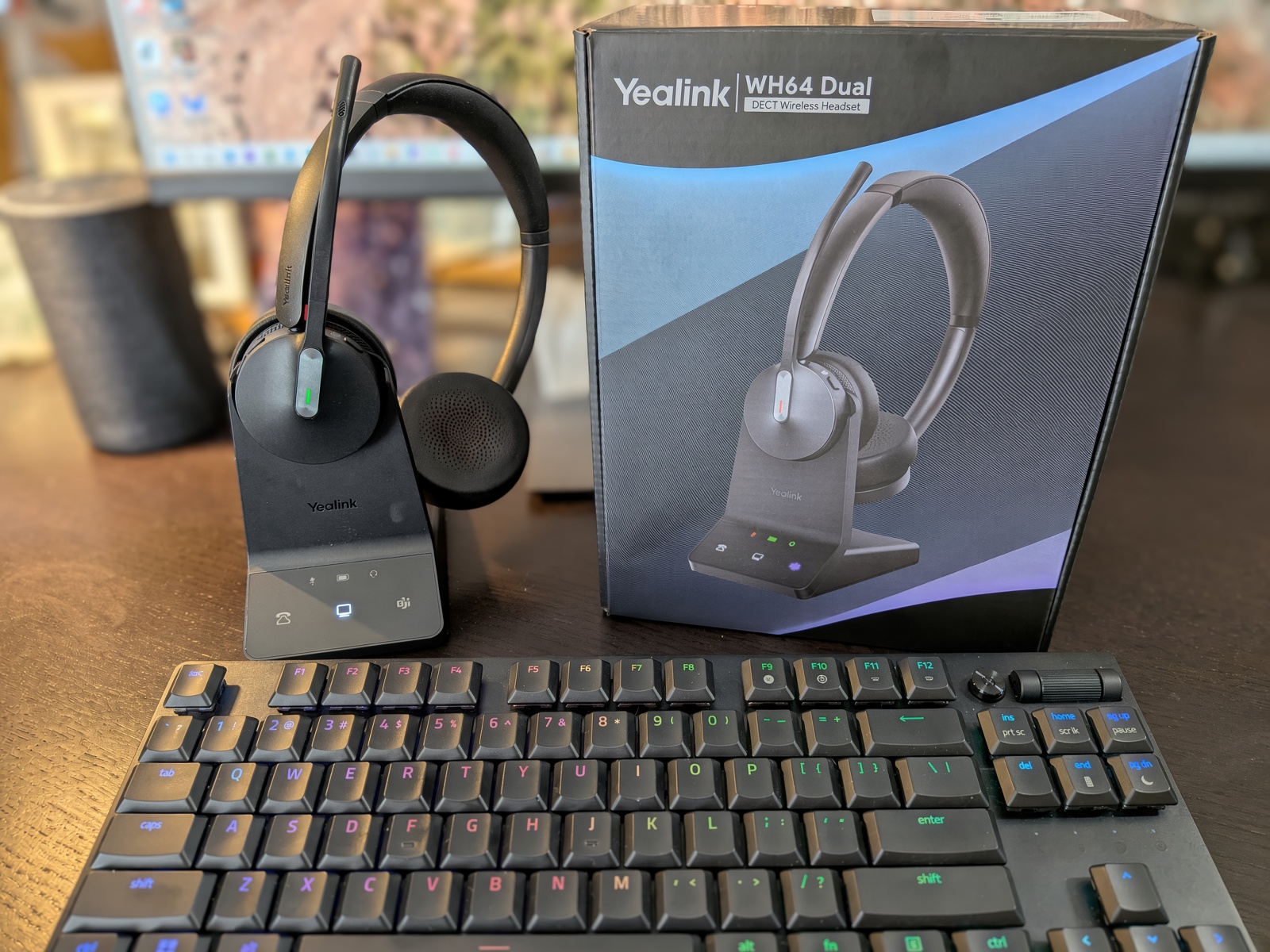
The Yealink WH64 Dual has Teams certification, a triple-mic array, and utilizes a hybrid DECT and Bluetooth design, which allows it to seamlessly connect to your PC, mobile phone, and an IP phone simultaneously. It puts itself in the mid-tier pricing range when taking on other competitors like Jabra. For the hybrid worker who has to deal with a desk phone, a softphone, and a cell phone on a daily basis, the WH64 Dual removes a lot of daily friction while sounding great. If you’re searching for the best headset for working from home take a look at the Yealink WH64.

- 606 Ft DECT&BT Headset : Dect & Bluetooth dual-mode wireless headset, enabling seamless plug-and-play applications in multi-devices (IP phone, PC, Cell phone). DECT Tech bring superior 606 ft long range, higher density, and safer calls.
- Noise-cancellation Headset: 3x noise cancelling mic and Acoustic Shield Tech 2.0, auto-block background noise. Advanced stereo tech delivers full dynamic sound quality, and achieves immersive & interactive communication.
- Extended Battery Life: Headset with DECT base offers extended talk time, Bluetooth mode-26H (mono), 32 H (dual), DECT mode-14H (mono), 16H (dual),1.5H fast charging time. On ear headset can perform energetically after a short break.

You can check current availability and pricing for the Yealink WH64 Dual here.
Yealink WH64 Dual DECT Bluetooth Wireless Headset for Phone PC Mobile Teams Stereo Overview
As the model name implies, the Yealink WH64 features two ear cup headphones with a charger that doubles as a transmitter for the headphones and a faux leather headband. The technology behind the product uses two ear cups for stereo audio for both listening to and sitting in on calls. The mic folds away when not in use.
In the box, you will find WHB640 base, a carrying pouch, two charging cables one of which is USB-C and one of which is Micro, a manual, a power adapter, and a USB-A to USB-C converter. The power adapter is for the base station but you can also connect the headset to your PC using a USB cable and even use it as a wired headset if the battery runs out during a marathon call.
DECT and Bluetooth Connectivity for Multi-Device Work
Due to the way both devices connect via the same radio signal, the “Dual” nomenclature is used. The base connects to the PC via USB or a desk phone that is compatible. Bluetooth 5.2 connects to your smartphone. With Bluetooth 5.2, you can make mobile calls while in a Teams meeting.
There is support for desk phones, however, there are some caveats. For example, Yealink T-series models like the T54W and T57W connect to the base via USB, while the T29G requires the EHS62 adapter or a telephone cable.
Some of the phones mentioned in the list are third-party models from Poly, Grandstream, Cisco, and Avaya, while the requirement for the connection varies. The EHS adapter is typically where things get hung up when trying to set things up.
You can opt for a simpler single-connection alternative in the form of the Yealink UH37 USB headset for less.
Noise-Canceling Microphones and Call Clarity
Three microphones are used for Yealink’s Acoustic Shield 2.0 processing. Call audio is reportedly clear by users with household noise in the background. The boomp mic is also close to your mouth and with the proximity effect, can give you much clearer calls than with a software-based mic.
On the listening side, 32-ohm dynamic drivers provide a wide stereo image, and active noise cancellation trim off sounds like HVAC hum and traffic.
When it comes to listening music, my experience has been good but I typically switch to my dedicated Soundcore Anker Life Q20 head phones. The Yealink WH64 is intended to be an office headset that handles Spotify rather than as audiophile headphones.
Battery Life, Fast Charging, and Wireless Range
Run-time depends on the radio you use, but the gap is significant enough to work around.
| Mode | Dual (stereo) | Mono |
|---|---|---|
| Bluetooth | 32 hours | 26 hours |
| DECT | 16 hours | 14 hours |
DECT radios will drain faster since they maintain a strong, dedicated connection. A base charge takes about 1.5 hours. Although a short break at lunch will yield noticeable run-time.
DECT radios become worth the money when talking about run-time. DECT can maintain a connection up to an impressive 606 feet in open air, as compared to 50 meters for Bluetooth. Most houses will allow you to make calls while you walk to the kitchen or a back bedroom.
Comfort and Busy-Light Design for Long Shifts
The on-ear designs employ breathable and soft padding combined with light clamping force, allowing several users to take calls back-to-back with no discomfort. The adjustable headband maintains its position and does not slip.
You have to sacrifice some heat buildup with these headsets. The ear padding is designed to provide contact with the ear and, in combination with heat, will make you uncomfortably hot after a few hours.
Red busy lights on the boom arm will signal a call is active, and it is a thoughtful design feature for open work spaces. The Jabra Engage 65 line also has a call-indicator light, and it should make fans of that line particularly pleased.
Pros and Cons
Pros
- True Dual DECT and Bluetooth connectivity also for multipoint device switching.
- The DECT range goes up to 606 feet, which is far beyond Bluetooth range.
- The battery gives up to 32 hours of talk time and takes 1.5 hours to charge.
- The 3-mic array as well as the Acoustic Shield 2.0 focus on cleanness of the caller audio.
- Drivers provide a clear separation of audio and video content so the phone can be used for audio and video.
- The Teams certification and a visual busy light focus on usage of the phone in shared workspaces.
- The handset comes with a two‐year warranty.
Cons
- Some users have reported the base station randomly losing connection.
- Some users have reported connection issues on certain Dell laptops.
- On-ear pads get hot during prolonged usage.
- The desk phone setup requires an EHS62 adapter.
- Support for individual buyers is more challenging compared to business accounts.
One strange issue
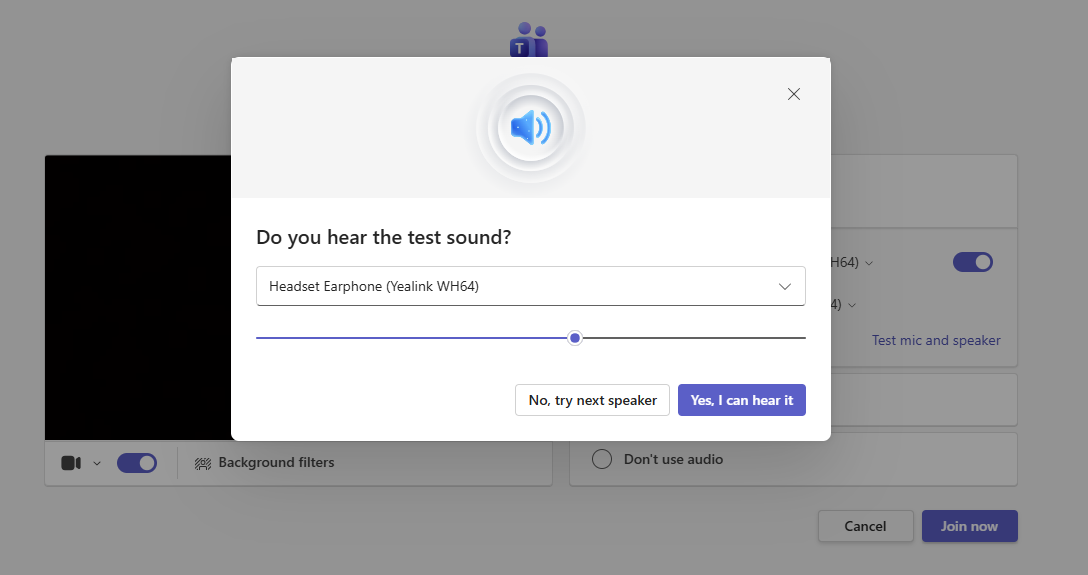
So far I’ve been enjoying the Yealink WH64 but I did have 1 issue that was perplexing and I lost some time troubleshooting. The pre-meeting speaker and microphone test in Teams does not work with the headset on my PC. When I join the call everything works as expected. If I call out using Google Voice from my Brave browser everything works as expected. I checked every Windows sound setting and everything was enabled and set correct but the Teams pre-test would not work for me. I have not tested with another laptop yet.
Customer Reviews and Real-World Reliability
Before I purchased the Yealink WH64, I used Grok and Gemini to search user reviews. Here is a summary of that analysis to help you make an informed decision.
What people love
Feels more like freedom than a leash.
This isn’t an unusual comment. Work from home buyers go to the kitchen, take a trip to the basement or go outside to make a call. People using warehouses and large-format offices say the same thing at a different scale. The reason people change their Bluetooth devices is because they’ve seen their devices turn into “robot soup” at the printer.
A mic that makes a noisy room more like a quiet room
People who purchased after a return of a cheap Bluetooth set talk about dogs, kids, an open office, and background noise. The other person hears you, not the room.
One headset for PC, desk phone, and cell.
IT buyers and people who have a small team like that one device can be used on a Yealink (or any other VoIP) desk phone, PC, and a mobile. Switching modes from the base is why people refer to it as an “all-rounder” rather than a “Teams-only” toy. The Teams SKU adds a dedicated button, if this is what you do all day. For other tools that you use such as Zoom and/or RingCentral, the UC SKU is the safer bet.
Comfort and battery for people who live in meetings.
Many users find the Dual to be light enough to forget, but padded enough to help. Music on the Dual is great for office playlists; however, it shouldn’t be substituted for dedicated headphones. No one buys this for concerts, they buy it for the 3 p.m. standup so it doesn’t feel like a clamp.
What users complain about
Reliability is what makes or breaks it.
For many buyers, the WH64 is a winner. Of the owners, however, one-star reviews state that the product has a short lifespan, lights stay white on the charging base, PC recognizes the product but no audio is supplied, and calls get dropped during a meeting. It is not the worst case scenario, but enough owners have created issues to justify the fact that I would not call this a “buy and forget for five years” Jabra-killer. Keep your receipt and be sure to test it thoroughly during the first week.
Firmware is a hassle.
Some audio/mic cutouts have been reported after firmware updates happened. Unlike firmware updates on other products, Yealink has not addressed this issue in a timely manner. Avoid taking firmware updates the day of a client call.
Comfort can differ based on the individual using it.
Some users hate the fit. Over-the-ear only. The vast majority of reviewers said the headset is fine for full work days, but a smaller subset (~10%) says the weight and pressure make the product a “disaster” to use. If you have big ears, a glasses habit, or failed to use on-ear headsets in the past, check if these headsets are for you against the return policy.
The boom and the base have minor issues,but are overall good.
The boom is not great. The boom’s arm cannot be folded using magnets, and it sticks out at an “antenna” angle when muted. Some users said the boom slowly droops. The base’s cable is a little fiddly and it is not possible to have a clean single tactical line to the PC. Firmware updates require the USB-C cable to be used. These headsets are designed to be used with VoIP/IP phones (check your phone first), but this means they are not meant for analog home phones (do not buy these).
Mac and mixed-app setups don’t work as well as Windows + Teams.
Connections are becoming unstable for some users. Button functions that work well in Teams may not function in other software. The audio works, but the magic use of the headset to answer calls may not work.
Who Should Buy the Yealink WH64 Dual?
Buy the Yealink WH64 Dual if you make calls from a fixed desk, use Teams, and want to take cell phone calls without the hassle of swapping headsets. The DECT base and long roaming range make this headset perfect for call center employees, and support staff that is stuck at their desk phones.
It’s also a good choice if you want to listen to music while working or if you want to record meetings as the Yealink WH64 Dual offers stereo audio, unlike most business headsets.
Don’t buy the Yealink WH64 Dual if you work on your laptop and phone from cafes, airports, or similar. A Bluetooth headset costs less and has no base you will never use. Also, more sensitive ears may want an over the ear headset with better airflow.
Conclusion
The Yealink WH64 Dual works as expected and justifies the multi-device adoption. It has what it takes with it’s DECT range a Bluetooth for your mobile phone, and a rechargeable battery to avoid using its charging dock until lunch.
Consider the compatibility issues with the base stations and laptops when thinking about buying this headset. Also, make sure to look at Yealink’s list to check the adapter you may need to buy for a T29G or an older Poly VVX.
For those that do four or more hours of calling a day from a home office, the Yealink WH64 Dual is a good start when thinking about an upgrade from a regular consumer headset.
Frequently Asked Questions
Are Yealink headsets any good for working from home?
For already established Yealink desk phone and Microsoft Teams users, Yealink headsets function great for working from home. The WH64 Dual got solid marks for microphone clarity and comfort, but there are some issues users run into relating to driver compatibility and laptop support.
Can the Yealink WH64 Dual connect to a PC, mobile phone, and desk phone?
Yes. The Yealink WH64 Dual is able to connect to each of these devices. The connection to the desk phone is over USB for newer models of Yealink desk phones, and for prior models of Yealink desk phones it requires the EHS62 adapter or a standard RJ-9 telephone cable.
How long does the battery last with the Yealink WH64 Dual?
In Bluetooth mode with dual-ear, the battery can last up to 32 hours. The battery life drops in DECT mode to about 16 hours. A fully depleted battery takes 1.5 hours to recharge.
Is the Yealink WH64 Dual comfortable for all-day Teams calls?
Most of the users reported a great deal of comfort with the headsets throughout the work day from light clamping pressure and an adjustable and padded headband. The main comfort complaint is thermal heat of the on-ear pads due to the pads being flush to the ear and providing no airflow.
What distinguishes the Yealink WH64 and WH62 headsets?
Bluetooth is available in the WH64 in addition to DECT, whereas the WH62 only has DECT through its base station. For flexibility to take calls on the same headset, choose the WH64 Dual. The other version of the WH62 is less expensive, if all your calls come from your PC or desk phone.


